
Choose where to click
Follow your pointer, save one location, or click a list of points in order.
Follow the cursor
Under Position, select Current cursor. The app clicks wherever the pointer is at the moment of each click.
Save a fixed point
Select Fixed point. Move the pointer over your target and press F7. You can also select Pick and move the pointer before the countdown ends. Check the X and Y coordinates before starting.
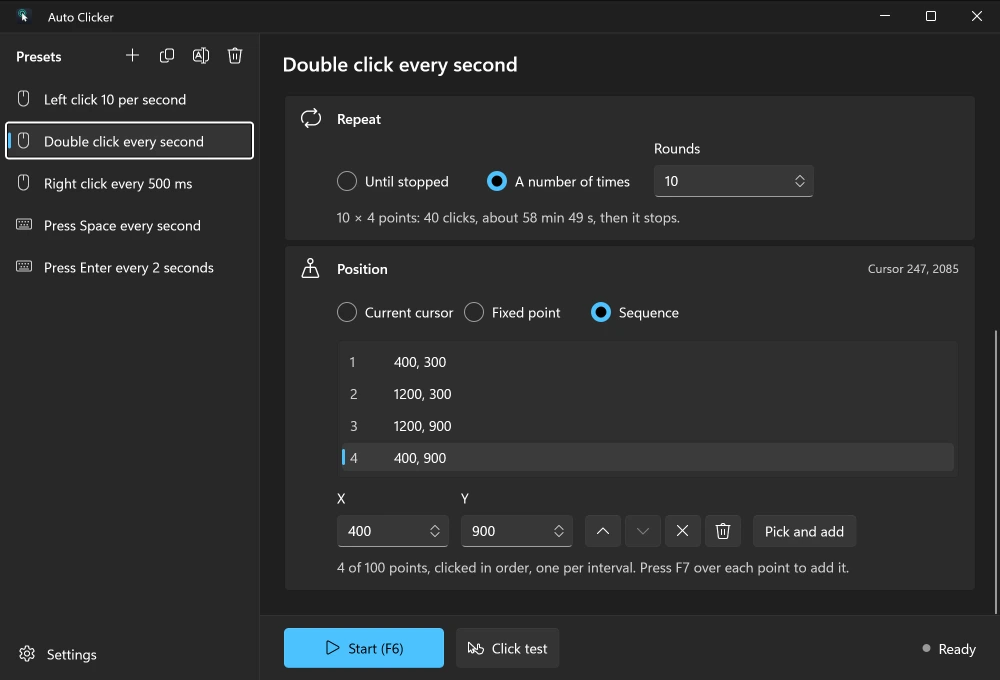
Build a sequence
Select Sequence and press F7 over each point in order. Pick and add also captures each location after a countdown. A sequence can hold up to 100 points.
Check the positions
Put the target window where it was when you recorded the points. If the window moved, pick the points again. Use a slow interval on the first run to check the order.